
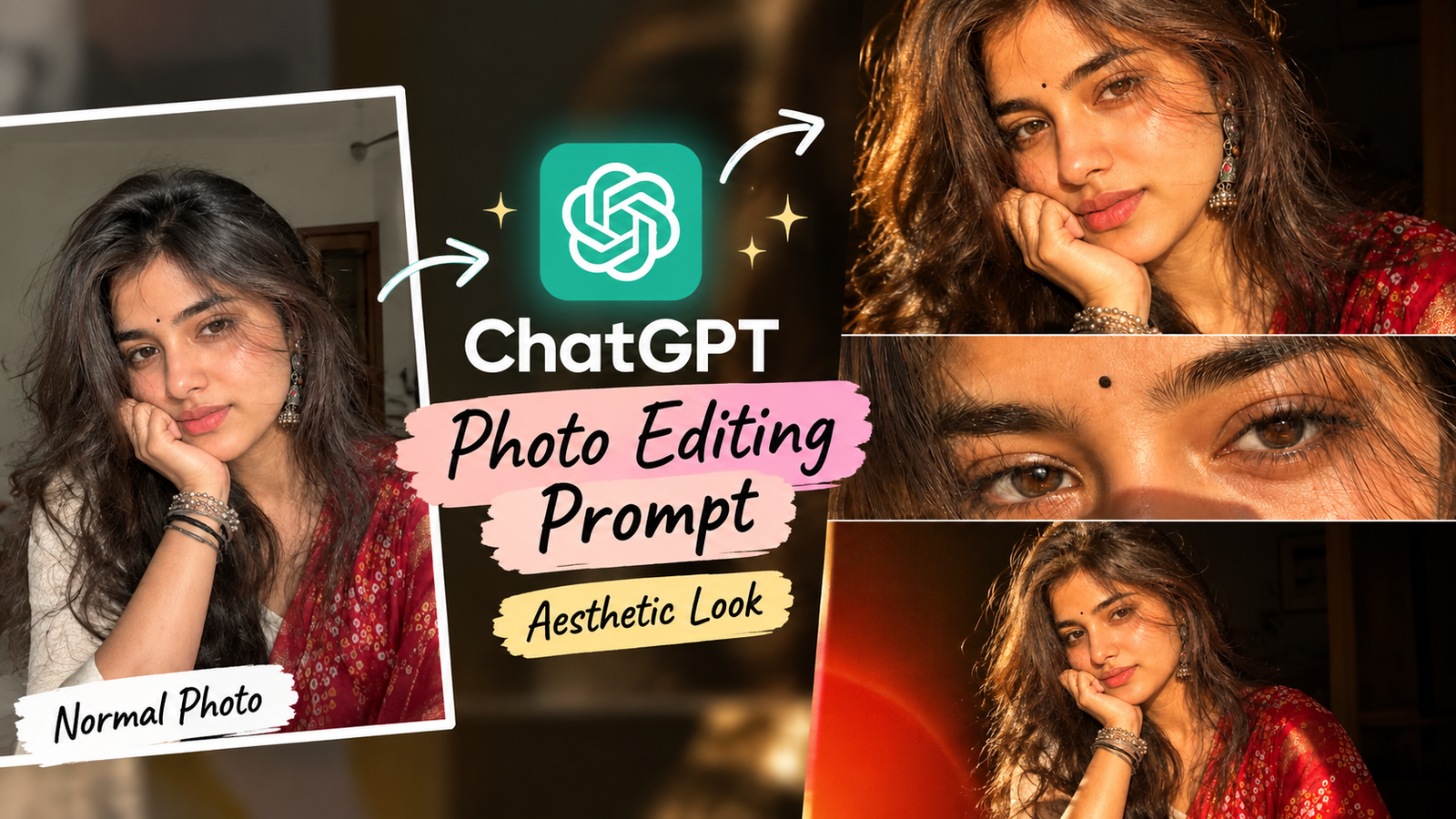
Aajkal social media par normal photos ko AI ki help se aesthetic, cinematic aur editorial-looking portraits me transform karne ka trend kaafi popular hai. Ek simple phone photo ko warm flash, close-up framing, realistic skin texture aur cinematic color grading ke saath completely different look diya ja sakta hai.
Agar aapne aisi photos dekhi hain jisme close-up face, detailed eyes, warm flash lighting aur multiple portrait crops ek hi image me dikhte hain, to aap bhi similar style ChatGPT ki image editing capabilities ke through try kar sakte hain.
Is article me aapko normal photo se aesthetic photo banane ka ChatGPT prompt, step-by-step method aur different editing variations milenge.
Normal Photo Ko Aisi Aesthetic Photo Kaise Banaye?
ChatGPT me existing image upload karke aap us photo ke specific elements ko change karne ke liye natural-language instructions de sakte hain. Aap background, lighting, composition, clothing aur overall visual style ko edit karne ke liye prompt de sakte hain. ChatGPT Images existing images ko edit karne aur selected areas par targeted edits karne ko support karta hai.
Is type ke edit ke liye sabse important hai ki prompt me clearly bataya jaye:
- Face same rahe
- Facial identity preserve ho
- Natural skin texture maintain ho
- Warm flash lighting add ho
- Close-up portrait framing ho
- Eye-detail crop create ho
- Cinematic color grading ho
- Image realistic lage
Normal Photo Se Aisi Photo Banane Ka ChatGPT Prompt
Neeche diya gaya prompt aap apni normal photo upload karke try kar sakte hain.
Copy-Paste ChatGPT Prompt
Edit my uploaded photo into a realistic viral aesthetic portrait while preserving my exact facial identity, facial features, natural skin texture, hairstyle and body proportions.

Create a warm direct-flash photography style with a slightly dark indoor background, realistic skin texture, subtle shadows and a natural editorial look.

Make the composition feel like a stylish three-panel photography collage:
1. a close-up portrait showing my face and upper body,
2. a detailed close-up crop focusing on my eyes and eyebrows,
3. a wider portrait showing my outfit and overall pose.

Keep all three panels visually consistent with the same person, hairstyle, skin tone and lighting.

Use warm flash highlights, realistic camera grain, subtle film texture, natural imperfections and cinematic color grading. Make the image look like an authentic high-quality fashion photograph taken with a camera rather than an AI-generated image.

Keep my face recognizable and do not change my identity, facial structure or expression unnecessarily.

Do not add text, logos, watermarks or extra people.
OpenAI ki image prompting guidance ke according, existing image edit karte waqt what should change aur what should remain unchanged clearly specify karna useful hota hai. Small, targeted revisions bhi generally easier to control hote hain.
Is Photo Style Me Kya Special Hai?
Reference-style photo ko sirf “aesthetic photo” kehne se same visual effect milna difficult ho sakta hai. Is look me several elements combine hote hain.
1. Direct Flash Lighting
Face par strong but realistic flash highlight photo ko candid-camera look deta hai.
2. Warm Color Tone
Warm orange/yellow highlights photo ko nostalgic aur cinematic feel dete hain.
3. Close-Up Framing
Face ko frame me prominent rakhne se portrait more personal aur editorial feel karta hai.
4. Eye Detail Crop
Eyes ka close-up crop collage ko more dramatic banata hai.
5. Multiple Frames
Same photo ko different crops me show karne se ek single portrait ki jagah editorial photoshoot jaisa appearance create hota hai.
6. Natural Skin Texture
Over-smoothing ke bajay realistic skin texture photo ko authentic camera-shot feel deta hai.
ChatGPT Me Normal Photo Ko Edit Kaise Kare?
Step 1: Apni Normal Photo Upload Karein
Ek clear photo choose karein jisme face properly visible ho. Front-facing ya slightly angled portrait dono use kiye ja sakte hain.
Step 2: Prompt Paste Karein
Upar diya gaya ChatGPT photo editing prompt copy karke image ke saath send karein.
Step 3: Result Check Karein
Agar first result me lighting ya crop exactly desired nahi hai, to poora prompt dobara likhne ki zarurat nahi hai.
Instead ek specific instruction dein:
Make the flash lighting slightly warmer and more natural. Keep my face, hairstyle, clothing and composition unchanged.Ya:
Make the eye-detail panel closer and sharper while keeping the same person and overall collage layout.ChatGPT Images me existing image upload karke direct edits describe kiye ja sakte hain, aur specific area ko select karke targeted edit bhi kiya ja sakta hai.
Sirf Single Aesthetic Portrait Chahiye?
Agar aapko three-panel collage nahi chahiye aur sirf ek normal photo ko reference-style aesthetic portrait banana hai, to ye shorter prompt use kar sakte hain.
Edit my uploaded photo into a realistic warm-flash aesthetic portrait.

Preserve my exact facial identity, facial features, hairstyle, skin tone and natural skin texture.

Use direct camera flash, warm highlights, a slightly dark background, realistic shadows, subtle film grain and cinematic editorial color grading.

Keep the pose natural and the face recognizable. Make it look like an authentic candid fashion photograph taken with a professional camera.

Do not add text, logos, watermarks or extra people.
Face Same Rakhne Ke Liye Important Prompt
AI editing me sabse important concern hota hai ki edit ke baad face unnecessarily change na ho.
Aap apne main prompt ke end me ye instructions add kar sakte hain:
Preserve my exact facial identity.

Do not change my face shape, eyes, nose, lips, eyebrows or natural facial proportions.

Keep my hairstyle and skin tone consistent with the uploaded photo.

Only change the requested lighting, composition and photographic style.
Ye approach especially useful hai jab aap style change karna chahte hain but person ko same rakhna chahte hain. OpenAI ki image prompting documentation bhi identity-preserving edits me unchanged elements ko explicitly mention karne ka example deti hai.
Warm Flash Aesthetic Photo Prompt
Agar aapko sirf warm-flash look chahiye, to ye prompt try karein:
Transform my uploaded photo into a realistic warm direct-flash portrait.

Keep my identity, facial features, hairstyle, clothing and body proportions unchanged.

Add realistic on-camera flash lighting with warm highlights, subtle shadows and a slightly dark indoor background.

Use natural skin texture, realistic imperfections, subtle film grain and a premium editorial photography look.

Do not over-smooth the skin or make the image look digitally generated.
Pinterest-Style Aesthetic Photo Prompt
Pinterest-inspired soft editorial look ke liye:
Edit my uploaded photo into a sophisticated Pinterest-inspired aesthetic portrait.

Preserve my face, identity, hairstyle and natural skin texture.

Use warm indoor lighting, subtle film grain, muted colors, soft shadows and a clean editorial composition.

Make the image look like a candid fashion photograph captured on a high-quality digital camera.

Keep the result realistic and understated.
Instagram Viral Photo Look
Instagram-ready version ke liye:
Turn my uploaded photo into a trendy Instagram editorial portrait.

Preserve my exact face, identity, hairstyle and natural proportions.

Use warm flash photography, cinematic shadows, subtle grain, realistic skin texture and a stylish dark background.

Create a premium fashion-editorial composition with natural imperfections and authentic camera detail.

Do not make the image look overly edited or artificial.
Eye Close-Up Photo Kaise Banaye?
Reference image me eye-detail crop ek important element hai. Agar aap separately eyes ka close-up banana chahte hain, to ye prompt use kar sakte hain:
Create a realistic close-up crop of the eyes from my uploaded portrait.

Preserve my exact eye shape, eyebrow shape, skin texture and facial identity.

Show detailed natural eyelashes, realistic skin texture and subtle warm flash lighting.

Keep the image photographic and authentic with natural imperfections.

Do not change the eye color, eye shape or facial features.
Three-Panel Photo Collage Kaise Banaye?
Agar aap exactly multi-frame aesthetic banana chahte hain, to prompt me layout clearly define karein.
Create a realistic three-panel vertical photography collage from my uploaded portrait.

Top panel: close-up portrait showing my face with warm direct flash.

Middle panel: detailed crop focusing on my eyes and eyebrows.

Bottom panel: wider portrait showing my hairstyle, outfit and natural pose.

Keep the same person, face, hairstyle, skin tone and photographic lighting across all three panels.

Use warm flash photography, realistic film grain, subtle shadows, dark background and cinematic editorial color grading.

Keep the collage clean and photographic with no text, logos or watermarks.
Photo Ko More Realistic Kaise Banaye?
Agar output too much AI-generated lag raha hai, to prompt me realistic photography details add karein:
Use:
- Natural skin texture
- Realistic pores
- Subtle film grain
- Natural imperfections
- Realistic flash exposure
- Soft shadow transitions
- Authentic camera detail
- Natural hair strands
- Realistic fabric texture
Instead of repeatedly saying “8K ultra realistic”, visual details describe karna generally more useful hota hai. OpenAI ki current prompting guidance bhi visible details—lighting, texture, materials aur composition—ko clearly describe karne par emphasis karti hai.
Agar First Result Perfect Na Ho To?
First generation ko final result maan lena zaroori nahi hai. Image editing ko step-by-step refine kiya ja sakta hai.
For example:
Lighting change:
Make the flash slightly softer while keeping everything else unchanged.
Skin change:
Make the skin texture more natural and reduce artificial smoothing.
Background change:
Make the background darker while keeping the subject and lighting unchanged.
Crop change:
Make the eye-detail panel slightly closer without changing the eyes or facial features.
OpenAI recommends small, targeted revisions rather than changing many things at once.
Common Mistakes
1. Sirf “Make It Viral” Likhnā
“Viral” ek vague instruction hai. Uske instead lighting, composition, crop aur photography style describe karein.
2. Face Preserve Instruction Na Dena
Agar identity important hai, to prompt me explicitly likhein ki face aur facial features unchanged rahen.
3. Bahut Zyada Effects
Flash, neon, HDR, glow, blur, heavy grain aur dramatic colors sab ek saath use karne se photo unnatural lag sakti hai.
4. Too Much Skin Smoothing
Realistic aesthetic photo ke liye natural skin texture maintain karna better hai.
5. Ek Saath Bahut Changes
Pehle lighting fix karein, phir composition, phir color. Step-by-step editing se result ko control karna easier hota hai.
Normal Photo Se Aisi Photo Banane Ke Liye Best Formula
Aap future me khud bhi prompts bana sakte hain:
Original Photo + Identity Preservation + Lighting + Composition + Background + Texture + Color Grading + Restrictions
Example:
Edit my uploaded photo.

Keep my face and identity unchanged.

Add warm direct flash lighting.

Create a close-up editorial composition.

Use a dark indoor background.

Add subtle film grain and realistic skin texture.

Use warm cinematic color grading.

Do not add text, logos or extra people.
Ye formula different aesthetic styles ke liye customize kiya ja sakta hai.
Final Thoughts
Agar aap apni normal photo se aisi aesthetic photo banana chahte hain, to sirf ek generic “make it beautiful” prompt use karne ke bajay photo ke important visual elements describe karein.
Warm direct flash, realistic skin texture, close-up framing, eye-detail crop, subtle film grain aur cinematic color grading jaise elements combine karke aap reference-style editorial look create karne ki koshish kar sakte hain.
ChatGPT Images existing photos ko edit karne ke liye upload-and-describe workflow support karta hai, aur specific portions ko select karke targeted changes bhi kiye ja sakte hain.
Agar aapko exact result nahi milta, to prompt ko completely replace karne ke bajay ek time par ek change request karein. Isse face, composition aur overall style ko consistent rakhna easier hota hai.
Related Reads
Aap apne ViralPromptAI ke related articles bhi link kar sakte hain:
- ChatGPT Photo Editing Prompts for Girl — different girl photo editing styles ke liye.
- Aesthetic Photo AI Prompt — aesthetic AI photo ideas aur prompts ke liye.
- 1980s Photo Prompt ChatGPT — retro/vintage photo editing style ke liye.
FAQs
Normal photo ko aesthetic photo kaise banaye?
Normal photo upload karke ChatGPT ko specific editing instructions dein, jaise warm flash lighting, cinematic color grading, realistic skin texture, background blur aur editorial composition.
Normal photo se viral Instagram photo kaise banaye?
Photo ko over-edit karne ke bajay lighting, composition, color grading aur background ko improve karein. Warm flash aur natural film texture jaise elements trendy editorial look create kar sakte hain.
ChatGPT me normal photo edit kar sakte hain?
Haan. ChatGPT Images existing image upload karke usme requested changes karne ko support karta hai. Aap direct edit instructions de sakte hain ya specific area select karke edit kar sakte hain.
Face ko same rakhne ke liye kya prompt likhein?
Prompt me clearly likhein: “Preserve my exact facial identity, facial features, face shape, hairstyle and natural skin texture. Only change the requested elements.”
Kya three-panel aesthetic photo ChatGPT se bana sakte hain?
Aap ek uploaded photo ko reference dekar three-panel collage composition describe kar sakte hain. Top close-up, middle eye crop aur bottom wider portrait jaise layout ko prompt me clearly specify karein.
SEO Settings
Focus Keyword:normal photo se aesthetic photo kaise banaye
Secondary Keywords:
- normal photo ko aesthetic kaise banaye
- normal photo editing prompt
- ChatGPT photo editing prompt
- aesthetic photo prompt
- normal photo se viral photo
- AI photo editing prompt
- ChatGPT photo editing
- aesthetic girl photo prompt
- viral photo editing prompt
- Instagram aesthetic photo prompt
- normal photo ko stylish kaise banaye
- ChatGPT image editing prompt
SEO Title:Normal Photo Se Aisi Aesthetic Photo Kaise Banaye? ChatGPT Prompt
Meta Description:Normal photo se aesthetic viral photo banaye. Try this ChatGPT photo editing prompt for warm flash, cinematic lighting, eye close-up and photo collage.
Slug:normal-photo-se-aesthetic-photo-kaise-banaye
Category:ChatGPT Prompts
Tags:ChatGPT Prompts, ChatGPT Photo Editing, Aesthetic Photo Prompts, AI Photo Editing, Girl Photo Prompts, Viral Photo Editing, Instagram Photo Prompts, ChatGPT Image Prompts
Featured Image Alt Text:Normal photo edited into a warm flash aesthetic girl portrait using ChatGPT
Featured Image Title:Normal Photo Se Aesthetic Photo Kaise Banaye
Featured Image Caption:Normal photo ko warm flash aur cinematic editing ke saath aesthetic portrait me transform karein.
Featured Image Description:A realistic aesthetic girl portrait showing a warm direct-flash photography style, cinematic lighting, natural skin texture and editorial photo composition created from a normal photo.